

Reports TV
Big-screen reports.html — Project + Agent matrices, plan-usage pies. Operators glance without scrolling the whole world.
J.A.R.V.I.S. // Command Center · Home Office
This page is a friendly onboarding guide for new developers and AI agents joining the Todolist / multi-project automation stack. It explains the room, the seats, the screens, and how work flows — without dumping the entire board into your context.
You are not joining a single repo with a single dashboard. You are joining a command center: a home-office wall of screens, a laptop Secondary seat, live Mission Control on DreamHost, and a set of agent skills that must not step on each other.
Humans (Operator / Ara) steer. Agents implement under exact go, or they
observe, plan, and report. This page is the handshake — what am I looking at, and
what am I allowed to touch?
specs/index.json) and Mission Control tasks — not here.
Below is the real Command Center Home Office — big-screen Reports TV, Alienware Heavy desk, multi-monitor Mission Control, and the green-backlit Secondary laptop. Use it as mental model, not as a pixel-perfect UI spec.
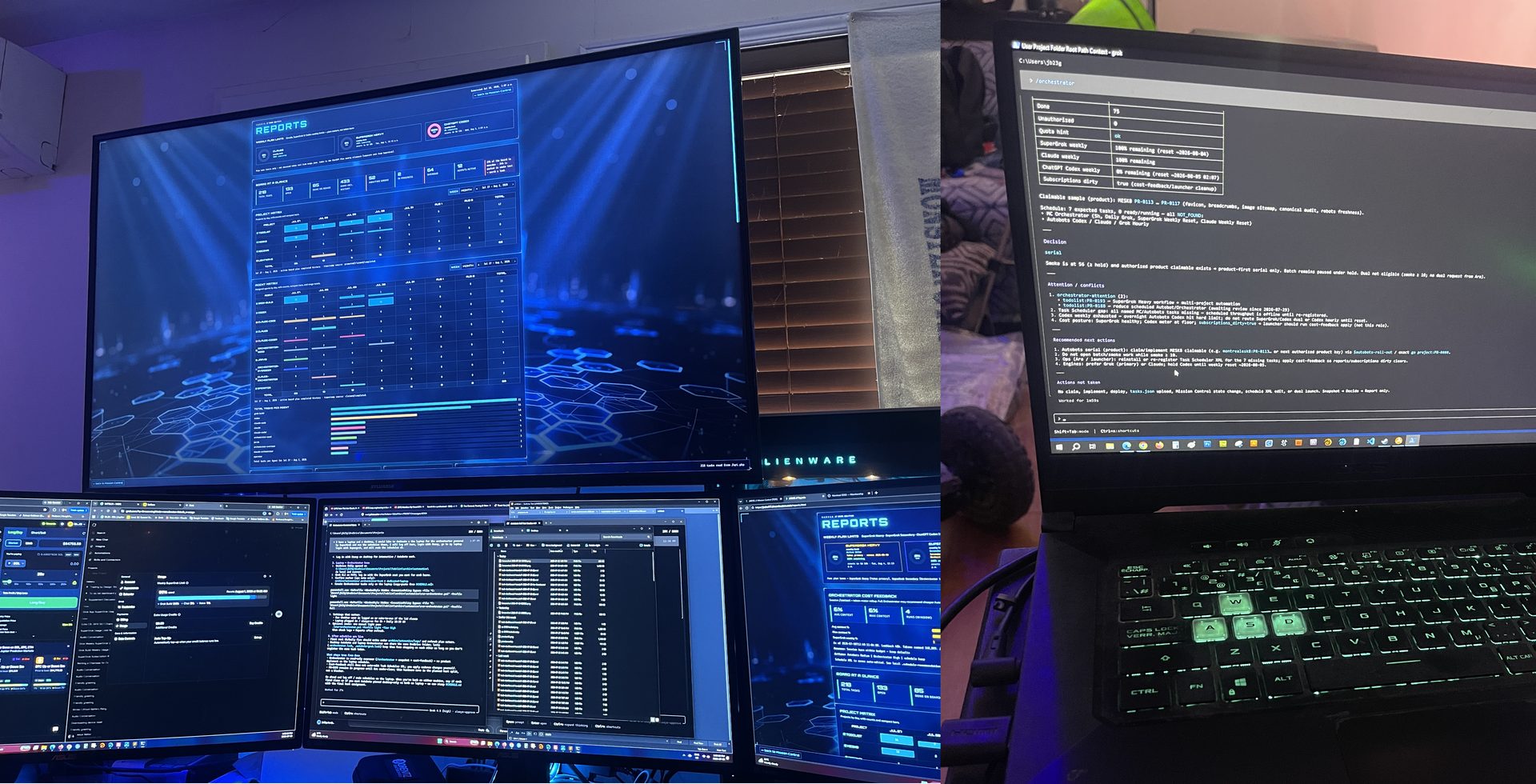
command-center-home-office.jpg also works in-browser from this folder.
background-image, open the floor photo URL above.
Big-screen reports.html — Project + Agent matrices, plan-usage pies. Operators glance without scrolling the whole world.
SuperGrok Heavy interactive seats: design, dev (reports analyst), orchestrator. High-context, exact-go product work.
Scheduled Autobots + shared Orchestrator clocks. Secondary SuperGrok plan — not the Heavy wall twin.
“Seat” is not a metaphor for a tab — it is a runtime identity with stamps, claim rights, and sometimes a physical machine.
| Seat / plan | Typical host | What it does | Do not |
|---|---|---|---|
SuperGrok Heavyheavy-dev · heavy-design · heavy-orchestrator |
Alienware (Area23) | Interactive PLAN → exact go implement; reporting analyst; PM snapshot |
Run scheduled Autobots claim loops; twin-fire laptop clocks |
SuperGrok Secondaryorchestrator · Autobots |
Laptop LAPTOP-DVU2VF95 |
Hourly Autobots, 5h/Daily orch, weekly reset — Ready schedules | Pretend to be Heavy; enable Heavy wall schedules |
| Codex / Claude | Assigned lanes | Product PRs when authorized; backup / parallel capacity | Invent Operator stamps; claim Condo/Personal |
| Operator (Ara) | Human | Exact go, smoke Approve, capacity, condo/personal | — |
completed_agent · completed_plan · assigned_agent ·
verified_by. Never fake Operator.
dashboard-test.html —
task board, status chips, Specs | Checklist panels, New Task / Next ID.
SoT is DreamHost api.php, not a local board dump.
Agents: do not trust HTML shell counts (CSR) —
use board-agent.php.
reports.html — Board tiles, Project Schedule Matrix + Agent matrix (one pack), collapsible deep dive / money, fixed weekly plan pies. Agents: same rule — board-agent.php / data/board-agent.json for live numbers.
agent-desk.html +
data/agent-context.json — handoff.
Live board counts (DIP-0216):
board-agent.php ·
board-agent.json.
Hot: specs/index.json ·
pages under specs/PR-####.html.
Index also links board_agent for tool-gated agents.
Do not invent acceptance from proposals alone.
/heavy-dev, /heavy-design). Read, diagnose, propose.
No product edits until exact go PR-#### / go DIP-####.
go → ask which PR/DIP.
proposals.md for every pass.
Seat=… · Plan=… · Skill=… · Working on PR-… · Blocked by… · Next smoke…
| Path | Role |
|---|---|
Projects/.agents/skills/ |
Shared skills (heavy-dev, orchestrator, autobots-roll-out, …) |
Todolist/public/ |
Deployable HUD (dashboard, reports, specs, agent-desk) |
Todolist/public/intro/ |
This intro — local/intranet; own CSS + photo |
Todolist/archive/docs/proposals.md |
DIP scratchpad (ideas, not live acceptance) |
Todolist/workflow.md |
L0 authorization ladder, ID claim, go rules |
Todolist/scripts/ |
Deploy helpers, matrix verify, seat-bus tools |
Live site root (when deployed): jesbel17.dreamhosters.com — this intro folder may stay local until an intranet section is promoted.
Design / idea vs implementable code unit. Claim IDs via API peek/claim — do not hand-pick collisions.
Human (or designated) verification on a real display. Agent wire-check ≠ TV smoke.
Heavy ↔ Secondary channel on DreamHost (seat-bus.php) without WinRM.
Reports viewport: Board tiles + Project matrix + Agent matrix in one block above plan pies.
When you are ready to work: load your skill, state PLAN MODE if interactive,
and wait for a named go. Welcome aboard.